Fhaloness
InkGd integration
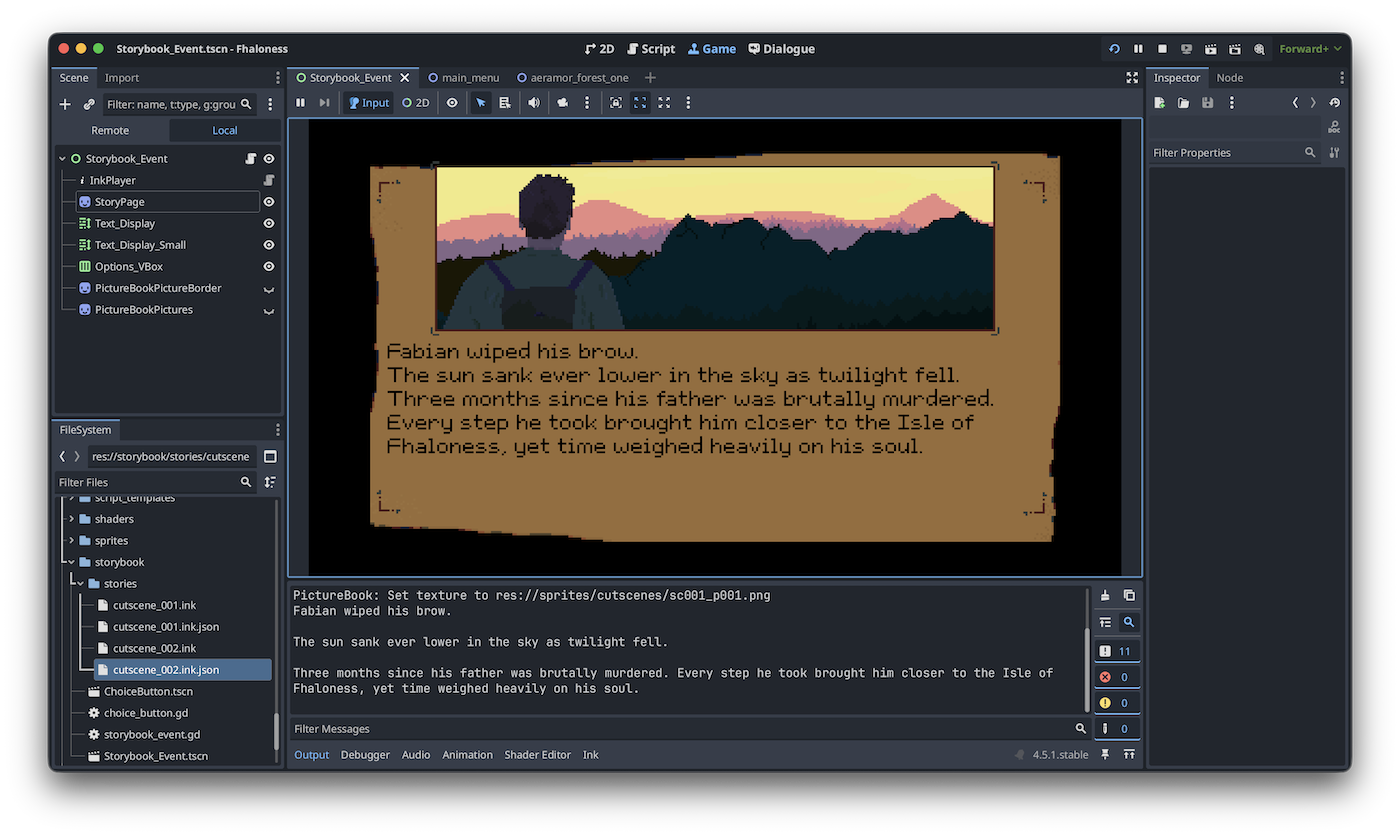
No fancy screenshots this time, but after a lengthy hiatus, I’m dipping my toes back into game dev! Today’s topic is about InkGd and using that for my story screens.
One of the main influences for Fhaloness is the classic DOS game “Betrayal at Krondor”. Initially, my young teenage self had no idea what he was playing (I must’ve been 11 or 12 at the time), but over time, that game grew into one of my all-time favourites.
BaK had a unique approach to cutscenes. Some would be like a storybook, with a big picture and some text underneath. Other times, it would fill the screen with pages of text. But since it was very well-written, it was a highly engaging way to be drawn into the world of Raymond E Feist.
I’m aiming to use a similar cost-effective tool for certain cutscenes and brief interactions in Fhaloness. I’d previously coded this manually. I’d stumbled across Inky and Ink (https://www.inklestudios.com/ink/) a while back and it got me thinking. I’ve been aware of Inkle’s tools for a while, but had never considered integrating them into Godot or Fhaloness.
As it turns out, someone had done the hard work and created InkGd, a plugin for using Inkle’s .ink files in Godot (https://github.com/ephread/inkgd/tree/godot4). It required some tinkering, but the results are there, I can now write my cutscenes in Inkle and easily import them into Godot.
This gives me immense flexibility and adds a whole new layer of interactivity to these pages of text. I’ve even managed to find a way to easily add the half-screen-size images into the pages. There’s plenty to do (animate the text, etc) but it’s completely functional and works really well!
Get Fhaloness
Fhaloness
A fantasy Adventure-RPG game (in development)
| Status | In development |
| Author | HobbesHK |
| Genre | Role Playing, Adventure |
| Tags | 2D, Fantasy, Godot, Pixel Art, Retro, Singleplayer, Story Rich |
| Languages | English |
More posts
- Updating the prologueJun 16, 2024
- Reflections on minigamesMay 19, 2024
- It's been a while - slowly continuing my work though!May 12, 2024
- It feels like blasphemy, but...May 02, 2022
- Minor update: Work is continuing!Apr 16, 2022
- Chapter 1 is now in production!Aug 03, 2021
- Mac version is now live!May 31, 2021
- Minor updateMay 29, 2021
Leave a comment
Log in with itch.io to leave a comment.